
05 / STRATEGY LIBRARY
LEARN TO
SPEAK.
The complete LAVOICE reference on its own page: the grammar of a voice request, how to extract material, the three arenas, multiplayer setup, every error message explained, and the verified download. Fifteen chapters, over eleven thousand words, written from the official pages and the developer's own answers.
WHAT IS IN HERE
How to play LAVOICE in 5 minutes
The route from the official control table — and what to do when the voice does not land.
LAVOICE is a voxel arena shooter where the weapon is the sentence you say out loud. That sounds like a gimmick and it is not: it is the whole game. You start with empty hands, the only way to make anything is to tear blocks out of the arena floor and walls, and the thing you make is assembled from those blocks according to what you asked for. Everything else — the shooting, the destructible map, the two-to-four-player parties — is built on top of that one loop.
This page is the reference for that loop. It is written for someone who has never opened the game, and it is also the reference for someone who has been playing for an hour and wants the grammar of the voice commands to stop being a mystery. Nothing here is invented: where the publisher publishes a fact, the fact is stated as published; where something was only ever seen on camera, it is called an observation.
Before you launch anything
There are two builds and they behave differently under the hood, but they are the same game. The desktop build is the official one: a free zip you download from itch.io, unpacked and run on Windows 10 or 11. It ships with an offline voice engine, so it can hear you without a network connection. This portal also runs the game in your browser, compiled to WebAssembly, where the browser's own speech recognition does the listening. You can read the full comparison in Browser or Desktop, but if you just want to start playing, press the play button on the homepage: nothing to install, no account, no download.
One thing is worth doing before anything else, on either build: open the settings and run the microphone test. The menu in the captured build of H-4 reads CREATE, CUSTOMIZE, TRAINING, SETTINGS, QUIT, and there is a separate TEST VOICE button at the bottom of the main menu. Press it, say a short sentence, and check that the input level meter moves. If the meter does not move, nothing you say will ever be understood, and you will spend twenty minutes blaming your accent for a permission prompt that was never granted.
The first five minutes, in order
- Test the microphone. Settings, then the microphone test. If the level meter is flat, allow microphone access for this site in your browser, then test again. On the desktop build, check that the right input device is selected.
- Open the training map. Training exists so you can learn the loop without a bot shooting at you. Pick TRAINING from the main menu and pick a map to train on. Nothing is unlocked and nothing is lost here.
- Extract material. Tap
Vonce — a quick press, not a hold. Aim at scenery in the scene and the blocks pull toward you. The MATÉRIA counter on the HUD goes up. You cannot build anything until this counter has something in it. - Say a request. Hold
Vand say one short sentence, or pressTand type it. The HUD shows LISTENING while it hears you, then BUILDING with a percentage while it assembles the thing. - Shoot it. Left click fires, right click aims. If the sentence did not land, the screen shows
NÃO ENTENDItogether with the transcription it caught, so you can see exactly which word it missed.
What the HUD is telling you
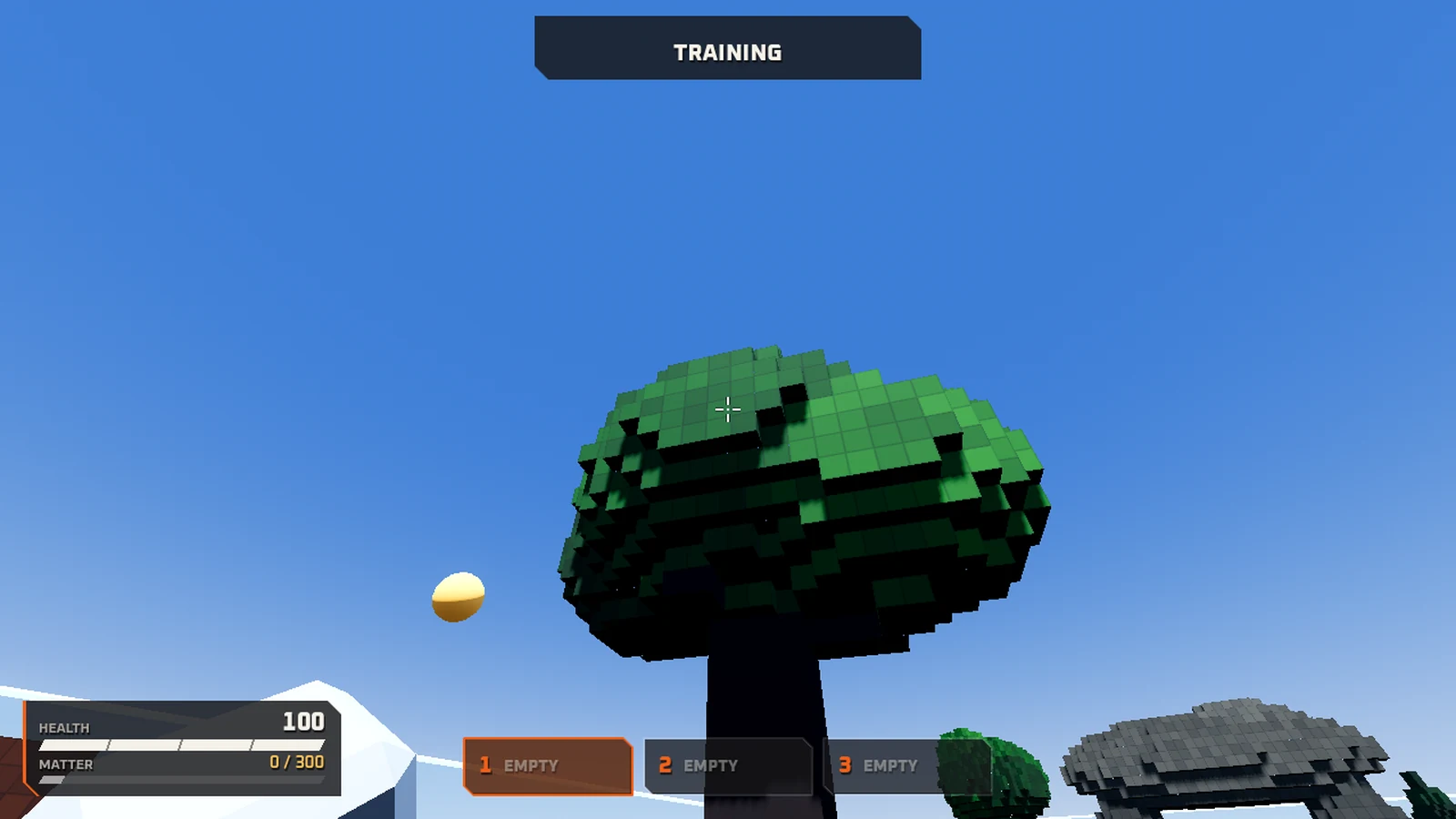
Four readouts sit on the screen during a match, and they are the whole of your interface. Health is the bar on the left, and it starts at 100. Next to it is the MATÉRIA counter, which shows how much material you are carrying and how much the currently selected request will cost — in the captured training frames it reads 0/300 at the start of a match. Those three boxes to the right of the counter are your weapon slots, numbered one to three, and they read EMPTY until you build something into them.
A banner at the top of the screen names the mode you are in — TRAINING in the captured frames. When the game is listening to you it shows LISTENING, and while it is assembling your request it shows BUILDING with a progress percentage. When a request fails to parse it shows NÃO ENTENDI and the words it thought you said.
All of this is observed in the publisher's own H-4 build and shown in the screenshots on this page. The developer has published no separate HUD documentation, so treat the readouts as things to watch rather than as a documented interface.
The loop, stated plainly
Pull blocks out of the world, spend those blocks on a sentence, use the thing the sentence produced, and pull more blocks out of the world. The publisher's own summary is that everybody starts empty-handed, that creating anything requires extracting blocks from the map, that bigger requests cost more blocks, and that the entire map is destructible, so the arena gradually disappears as the match goes on.
That last part is the strategic heart of the game. The floor you are standing on is ammunition. Every block you rip out to make a shotgun is a block that will not be there later, and the map does not grow back. A player who spends everything in the first thirty seconds has a powerful gun and a shrinking arena. A player who hoards material has a weak gun and more room to fight in. Almost every decision in this game is a version of that trade-off, and the rest of this guide is a detailed look at how to make it.
When the voice does not land
Sometimes the game will not understand you. It tells you what it heard: NÃO ENTENDI appears with the transcript it caught, and a phrase like “I want the sun… sun?” is a real example of the sort of thing that shows up. Three things fix it, in order of how often they are the answer.
- Shorten the sentence. Every request follows the same shape: want, quantity, object, that, action. A sentence out of a novel does not fit into that shape. “I want a pistol that shoots a pigeon that poops grenades” fits; a paragraph about a pistol does not.
- Type it instead. Press
Tand the request goes in as text. No microphone, no recognition, no accent — the same request, the same cost, the same result. This is the single most reliable tool in the game and it is free. - Send the voice log. The developer asks players to share the voice log the game recorded, so that phrases which did not land can be added to the dictionary. That is an open invitation rather than a promise that your sentence will work today, but it is the mechanism by which the dictionary grows.
None of this is the game being difficult on purpose. It is a test build, and the publisher says so plainly: expect bugs, and if the game does not understand something you say, leave a comment or post the phrase so it can be added to the dictionary.
Tap V or hold V: the one key that does two jobs
Get this wrong and the game will look broken. Get it right and the whole thing clicks.
Almost every new player hits the same wall, and it is almost never a microphone problem. The V key both talks to the game and mines the map, and the difference between the two is the difference between a press and a hold. Holding V to speak is the obvious thing to do — and while you are holding it, you cannot extract anything. Tap it, and you enter extraction mode. Hold it, and you speak. The game draws a line between the two by how long the key is down.
What each mode actually does
V key reference
| Input | Mode | What happens | What you see |
|---|---|---|---|
Tap V | Extraction | Blocks in your aim point are pulled out of the map and added to your material. | The MATÉRIA counter goes up. Nothing is said to the game. |
Hold V | Voice | The microphone listens. The request is built when you release the key. | LISTENING, then BUILDING with a percentage. |
Press T | Typed | You type the request and confirm it. No microphone involved. | The same build readout, without any listening. |
Hold Caps Lock | Team voice | Talks to the other players in the party instead of to the game. | Multiplayer only. It does not build anything. |
Both behaviours are on the official control table, which lists “Hold V: speak” and “Tap V: switch to extraction mode” as separate lines. That wording — switch to extraction mode — is important. It is a mode, not a one-shot action, so a tap puts you into extraction and you stay there until you leave it.
Why players get this wrong
Three different mistakes, all of them common:
- Holding V while trying to mine. You hold the key because you want to make something, the HUD shows LISTENING, and the blocks in front of you do not move. You are talking to the game about a weapon while standing in front of a wall full of material you cannot reach.
- Tapping V while trying to speak. A short press registers as a tap, so the game waits for a request that never comes. The HUD shows nothing happening and the microphone looks broken.
- Releasing V in the middle of a sentence. The build starts on release. Let go halfway through “I want a pistol that…” and the game hears half a sentence and builds nothing useful. This is the most common cause of a failed request among people who have the microphone working perfectly.
A practice drill that takes two minutes
- Open the training map and stand in front of a blocky tree or wall.
- Tap
V. Aim at the blocks. Watch the MATÉRIA counter rise. TapVagain when you have enough to be useful, and move on. - Now hold
Vfor a full second before you say anything, keep holding through the whole sentence, and release only after the last word. - Repeat five times. The gap between the two feels is exactly where the mistake lives, and after five reps your fingers know it.
The button you can hold instead
If the press-and-hold distinction is going to keep catching you out, press T instead and type the request. The publisher lists it as “type instead of speaking” in the same control table, and it works with no microphone at all. It is also faster than speaking once you are used to it, because you are not waiting on a speech recogniser to transcribe your sentence before the build starts.
There is one strategic difference worth remembering: typing is not a fallback that changes the rules, it is the same request going down the same pipeline. A typed sentence and a spoken sentence cost the same material, obey the same grammar, and produce the same result. If a spoken sentence fails, typing the identical sentence tells you whether the problem was the words or the microphone — which is exactly the question you want answered.
Voice commands that work
The sentences published on the official page, and the shape every request follows.
LAVOICE does not generate anything from scratch. It tries to fit what it hears onto concepts it already contains — a catalogue of base weapons, animals, objects, numbers and properties that the developer maintains. It is not an image generator and it is not a chat model. It is a parser with a very funny vocabulary, and once you understand the shape of a request, most of the difficulty disappears.
The grammar of a request
Every request that works follows the same order:
want → quantity → object → that → action
“I want a pistol that shoots a pigeon that poops grenades” is the publisher's own headline example and it fits the pattern exactly. Take it apart: want is “I want”, quantity is “a”, object is “pistol”, that is the connector, action is “shoots a pigeon that poops grenades”. The action slot accepts its own nested clause, which is why the pigeon can itself have a behaviour.
Every published example, and the official Portuguese list beside it:
The published sentences
| # | English | Portuguese | Shape |
|---|---|---|---|
| 1 | “I want a triple-barrel shotgun that shoots walls” | “quero uma escopeta de três bocas que atira paredes” | Weapon + quantity + that + action |
| 2 | “I want a turret that shoots exploding pigeons” | “quero uma torre que atira pombos explosivos” | Weapon + that + action + property |
| 3 | “I want a pistol with a bazooka body and six barrels” | “quero uma pistola com corpo de bazuca e 6 canos” | Weapon + body + quantity |
| 4 | “I want an RPG with 10 charges” | “quero uma RPG com 10 cargas” | Weapon + quantity |
| 5 | “I want three pigeons orbiting me” | “quero três pombos que orbitam” | Quantity + animal + property |
| 6 | “I want to fly” | “quero voar” | Movement, and it costs material too |
| 7 | “I want a pistol that shoots a pigeon that poops grenades” | “quero uma pistola que atira um pombo que caga granada” | Weapon + nested action |
The official promo puts it in one line
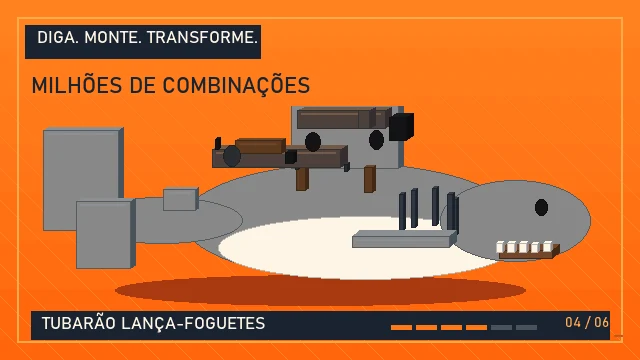
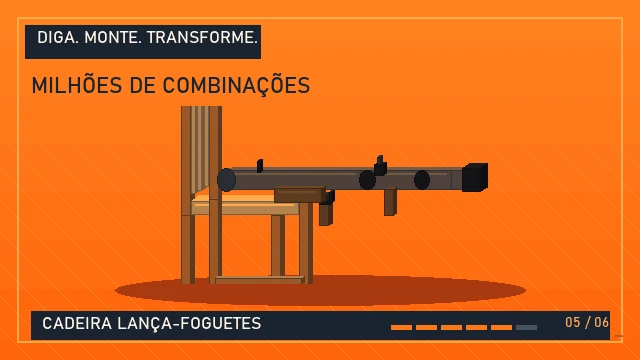
The publisher's own promotional animation for the game opens with three words in Portuguese: DIGA, MONTE, TRANSFORME — say it, mount it, transform it. The animation then demonstrates the grammar in the clearest way possible by showing a weapon being assembled out of loose blocks, one piece at a time, and it names the results as it goes: FUZIL (rifle), SHOTGUN, POMBO COM FUZIL (pigeon with a rifle), TUBARÕO LANÇA-FOGUETES (shark with a rocket launcher), CADEIRA LANÇA-FOGUETES (chair with a rocket launcher) and VASO SANITÁRIO ARMADO (armed toilet). The animation's own headline is MILHÕES DE COMBINAÇÕES — millions of combinations — and its closing card reads A IMAGINAÇÃO VIRA ARMA: the imagination becomes a weapon, with the instruction FALE O QUE QUISER, O JOGO FAZ — say what you want, the game does it.
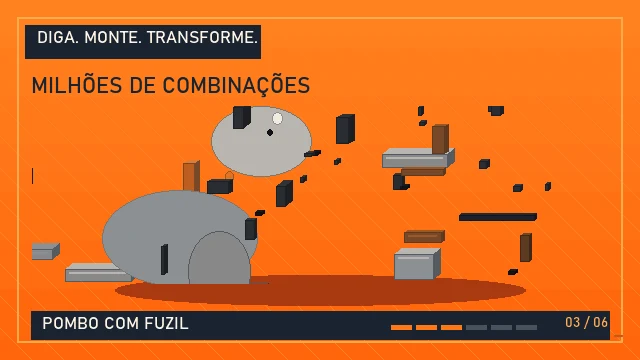
The important thing to take from the promo is that mount is the verb. The game does not merely choose a weapon from a list; it mounts one thing on another. A shark is not a weapon, but a shark with a rocket launcher is. A toilet is not a weapon, but an armed toilet is. The catalogue of base objects is wider than the catalogue of weapons, and the interesting requests are the ones that combine the two.
The four slots in detail
The base weapon
Pistol, shotgun, rifle, RPG, turret. These are the anchors. A request without one of them is not a weapon request — “I want to fly” is not a weapon, it is a movement request, and it still costs material.
The quantity
Numbers modify the request in two different ways, and the difference matters. “An RPG with 10 charges” sets the magazine size; the RPG still fires one projectile at a time. “A triple-barrel shotgun” changes the weapon itself; it now has three barrels. “Three pigeons orbiting me” sets how many entities exist. Watch for the difference between the modifier changing the thing and the modifier changing how much of it there is.
The object mounted on it
This is the fun slot: pigeons, sharks, toilets, chairs, walls. It can also be an animal that has a behaviour of its own, which is where the nested clause comes from — a pigeon that poops grenades has an action of its own, inside the action of the pistol.
The property
Some requests attach a property rather than an object. The clearest published example is the guided, self-targeting projectile: apply it to something and, when you fire while holding the right mouse button, it turns towards whatever you are aiming at. The developer describes this in detail in Homing and tracking. Another property in the official list is orbiting — “three pigeons orbiting me” — and movement properties exist too, since “I want to fly” is a request that grants flight.
Cost follows complexity
The publisher states the rule plainly: bigger requests cost more blocks. A sentence with five adjectives is a more expensive sentence than a bare noun. That has a direct consequence for how you speak. If your material counter is low, asking for a plain pistol that shoots is cheap and will succeed; asking for the same pistol with a bazooka body and six barrels may not be affordable yet. Short requests are not a compromise — they are the correct choice when you are poor, and the correct choice when you are in a hurry and somebody is shooting at you.
English and Portuguese
Voice commands work in English and Portuguese. The publisher publishes both lists on the same page, side by side, and the Portuguese list is not a translation of the English one — it is a separate set of sentences in the other language, using the publisher's own terminology. Either language works. What does not work is a request that is too long, too vague, or too clever for the grammar.
T. If it still fails, send the voice log the game recorded — the developer has explicitly asked for those, so that phrases which do not land can be added to the dictionary. That is how the catalogue of what the game understands grows.How to get material
Tap V once. Holding V is for talking, not mining.
Nobody starts with a ready weapon. To create anything you have to rip blocks out of the map, and the bigger the request, the more blocks it eats. The whole map is destructible, so the arena shrinks as the match goes on. Material is therefore not a resource you gather once — it is a running budget that you spend every few seconds.
The mechanics
- Separate the two jobs of V. Tap = extraction. Hold = voice request. Swapping the two is the most common mistake in the game.
- Aim at real blocks. Point at scenery in the scene. Aiming at empty air shows
NADA AO ALCANCE, which means there is nothing within reach to pull. - Watch the counter, not the animation. The MATÉRIA readout is the number that matters. When it stops rising, you have hit the limit of what you can pull in one go.
- Read the failure.
FALTOU MATÉRIAstops the build. It means the request needed more material than you are carrying. There is no published refund table and no partial build. - Reuse what you have. When asked about infinite ammo, the developer's answer was to conserve and reuse mass. That is the whole economy in one sentence.
What the HUD shows about material
What the build showed on camera
| Item | What it shows | Where it comes from |
|---|---|---|
| Input | One tap on V | Official control table |
| Source | Blocks from the map | Official page |
| Counter | 300 on the meter | Observed in one build video |
| Weight | CARGA 18 kg and -20% | Observation — no published formula |
| Slots | Three weapon slots | Observation, confirmed in the H-4 HUD |
| Flying | VOAR also spends material | Observation, matches “I want to fly” |
Every figure in the last two rows is an observation from the publisher's own build footage, not a published specification. The developer has never published a cost table, a formula, or a units definition, so treat them as the shape of the system rather than as numbers to plan around.
The cost rule, and why it changes how you speak
The publisher's rule is that bigger requests cost more blocks. The consequence is that verbosity is a financial decision. A long sentence with several adjectives is not a more impressive request for free — it is a more expensive one, and when you are down to your last fifty blocks, the difference between “a pistol” and “a pistol with a bazooka body and six barrels” is the difference between a weapon you can afford and a request that fails with FALTOU MATÉRIA.
This is worth internalising, because it inverts a habit that most people bring from other games. In a shooter, a verbose request for a complex weapon is free power. Here it is a purchase. The good players are not the ones with the cleverest sentences; they are the ones who say exactly as much as they can afford, which usually means less than they want to say.
Why the arena disappears
The publisher is explicit: the entire map is destructible, so the arena gradually disappears as the match goes on. Extraction is not free scenery harvesting — every block you take is a block that is no longer there, and the map does not regenerate during a match.
So the map is a shared, shrinking resource pool. Four players mining the same floor will empty it much faster than one. A player who extracts greedily, far from the fight, spends the ammunition of everybody in the round and gets less cover in exchange. A player who extracts only what the next request needs leaves the floor intact for the fight and keeps their options open.
A budget you can actually keep
Three habits that pay off immediately:
- Build the cheap thing first. A plain pistol that shoots is the cheapest useful weapon. It costs almost nothing, it proves your voice pipeline works, and it is better than nothing when somebody rounds the corner. Upgrade once you know the income rate.
- Extract in bursts, not constantly. Standing still and pulling blocks is loud, obvious and slow. Extract the block you need, then move, then build.
- Do not spend material on movement mid-fight. Flight is a request, and requests cost material. If you ask to fly in the middle of a firefight, you are spending the blocks you needed for the gun that would have won the fight.
Weapon slots and loadout
Three slots, one loadout, and what to build first.
The HUD carries three numbered weapon slots, and in the captured training frames they read 1 EMPTY, 2 EMPTY, 3 EMPTY at the start of a match. That is the observable part of the loadout system: three places to put things. The developer has published no loadout rules — not how many you may build at once, not whether building replaces an occupied slot, and not whether the slots are switchable in the field.
What to put in the first slot
A cheap weapon that fires. That is not a joke and it is not filler: in a game where ammunition is the floor, the first thing you should buy is the thing that lets you take the floor back. A plain pistol that shoots is the smallest possible purchase with a real payoff.
Only then upgrade. The instinct to open with the most impressive sentence you can afford is exactly backwards — it spends the material you need for the next thirty seconds of material income on a single weapon you will replace anyway.
Why three slots is interesting
Three slots is a small, meaningful number. It is too few to carry everything and just enough to cover three roles. The published sentence list happens to contain a natural trio:
Three slots, three roles
| Slot | Published sentence | What it is for |
|---|---|---|
| 1 | “I want a pistol that shoots” | The cheap, reliable answer. Always build something here first. |
| 2 | “I want a turret that shoots exploding pigeons” | Area denial. Something that keeps working while you move. |
| 3 | “I want an RPG with 10 charges” — or “I want to fly” | Either the burst option, or the mobility option. Both cost material. |
That is speculation about how to use the slots rather than a documented system, but it is a reasonable reading of a three-slot loadout in a game about conservation: one weapon for the fight in front of you, one for area denial, and one for movement or support. The published list supplies all three roles without inventing anything.
The turret is the odd one out
“I want a turret that shoots exploding pigeons” is the only published sentence describing something that is not carried. A turret is a thing you place, not a thing you hold, and it costs more to make than a hand weapon. If you have ever wondered what the expensive end of the material economy is for, it is probably this: a static emplacement that keeps shooting while you do something else.
The nested clause is where the fun lives
The publisher's headline example — a pistol that shoots a pigeon that poops grenades — stacks three concepts. A plain pistol shoots bullets. A pistol that shoots a pigeon shoots a pigeon. A pistol that shoots a pigeon that poops grenades shoots a pigeon that drops grenades, so every shot is a grenade delivery.
The cost of that stack is the thing to keep an eye on. Every additional concept is more blocks, and the developer's rule is that bigger requests cost more. The nested clause is the most expensive thing in the grammar and the most fun thing to say.
A note on what is not known
The publisher has not documented: whether a slot can be overwritten, whether there is a cooldown between builds, whether building is possible while moving, or whether the slots have an order of priority when you press fire. Everything in this chapter is either directly observed in the H-4 build or clearly marked as reasoning on top of an observation. If the developer publishes a slot list later, this is the section to revisit.
Controls reference
Every key the official control table lists, and what it actually does in the match.
This is the official control table from the publisher's page, unchanged, with the practical notes added underneath. If a key is not on this list, the game does not listen to it.
Official controls
| Key | Action | Watch out |
|---|---|---|
Hold V | Speak your request | Release and the game interprets it. The HUD shows LISTENING. |
Tap V | Switch to extraction mode | A single tap enters extraction. Do not hold it. |
| Left / right click | Shoot / aim | Hold right click to guide a homing projectile. |
WASD, Space, Shift, C | Move, jump, sprint, crouch | Shift is the sprint key, C is crouch. |
| Mouse wheel | Third-person camera | Turn the wheel. |
T | Type instead of speaking | Works with no microphone at all. |
Hold Caps Lock | Talk to other players | Multiplayer only. Never parsed as a request. |
Esc | Settings and microphone test | From the official control table. |
The keys that have two jobs
Three of these are worth calling out because they are where new players lose time:
Vis both the talk key and the mining key. Tap versus hold. There is a whole chapter on it.Tis not a chat key. It is the typed-request key, and it is the most under-used button in the game, because people assume a microphone is mandatory.- Right click is not a secondary fire. It is aim, and it is what makes guided projectiles work — hold it while you fire and the projectile turns towards the point you are aiming at. Homing and tracking covers this in full.
Mouse and camera
Left click fires, right click aims, and the mouse wheel moves the camera between first and third person. The third-person camera matters more than it sounds: LAVOICE is a game about reading a three-dimensional arena whose walls are also your ammunition, and seeing your own voxel body while you reposition is how you keep track of where the cover you are standing behind came from — and where the hole you tore in it is.
Team voice is not game voice
Holding Caps Lock talks to the other players in your party. It does not build anything, it does not extract material, and it will never be parsed as a request. If you are in a two-to-four-player party, this is how you tell the person on the other side of the map that the floor is nearly gone.
There is a useful piece of game design buried in that key choice: the game puts team communication on a key you cannot physically hold while you are also holding V. Two hands, two conflicting inputs, and the game makes you choose between talking to your team and talking to the game. Caps Lock is a toggle-style modifier rather than a hold, which is a small kindness, but it is still one more thing to think about in a firefight.
Escape opens the settings
Esc opens the settings and the microphone test. It is the same panel as the one in the main menu, and it is where the voice options live — microphone selection, input level, minimum volume and playback, all visible in the captured H-4 voice panel.
Maps and arenas
Original Arena, Space, Tokyo 3 — and the map selector you get before the match.
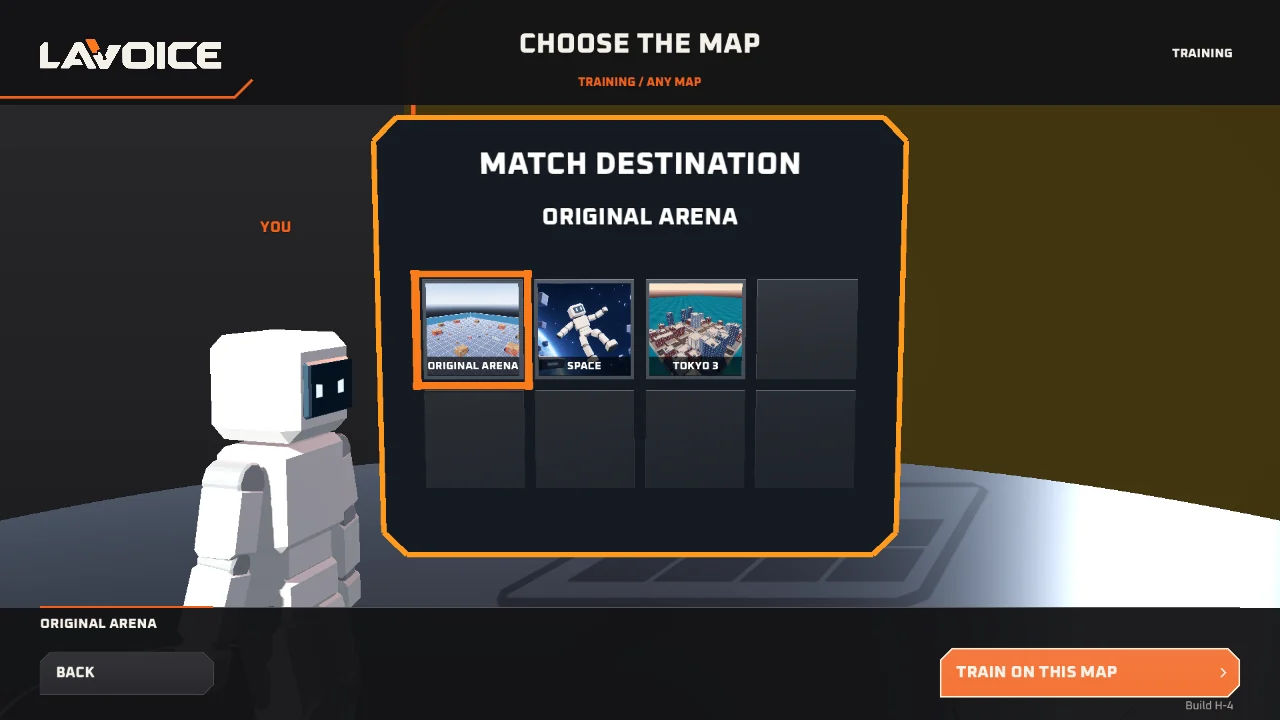
The map selection screen in build H-4 is titled CHOOSE THE MAP, with a panel headed MATCH DESTINATION and a grid of map tiles underneath. Three destinations are visible in the captured build — ORIGINAL ARENA, SPACE and TOKYO 3 — along with a TRAIN ON THIS MAP button and a BACK button. The label at the top right reads TRAINING with ANY MAP beside it, which is how you take the same arenas into the training mode.
Original Arena
This is the default destination and the one the training arena captures were taken in. It is a low, open, ground-level space: a flat blue-grey plane with blocky trees, red and grey structures, a stone archway and the occasional yellow pickup. The original arena is the publisher's own press shot, so it is the map most of the promotional material shows.
Structurally it is the most forgiving of the three for a new player, because it is flat. You can see people coming, there is cover at a human height, and there is enough open floor between the landmarks that you get a clean read on where a fight is happening. It is also the map where you learn to read the map itself, because the blocky trees and the grey stone are the same stuff you will be pulling out of the floor.
Space
A low-gravity arena set among planets and floating debris, with a white voxel astronaut drifting in the foreground and a planet filling part of the sky. There is almost no solid ground in the conventional sense, so the material in this map is whatever is floating and reachable — and the standard movement rules apply in a place where “up” is not a fixed direction.
Space is where the movement request earns its keep. Flight costs material like everything else, and in an arena where the geometry is loose, a player who can fly can also reach the blocks other players cannot. That is a real advantage, and it is a real cost, and the balance between them is exactly the decision the material system is built around.
Tokyo 3
A dense voxel city block on the water: towers, streets, rooftop detail and a helicopter. It is the most visually distinct of the three and, from what the captured material shows, the most vertical. Buildings give you sight lines that cut across the arena in ways the flat Original Arena never does, which makes it simultaneously the best and the worst place to fight: you can see further and you are seen further.
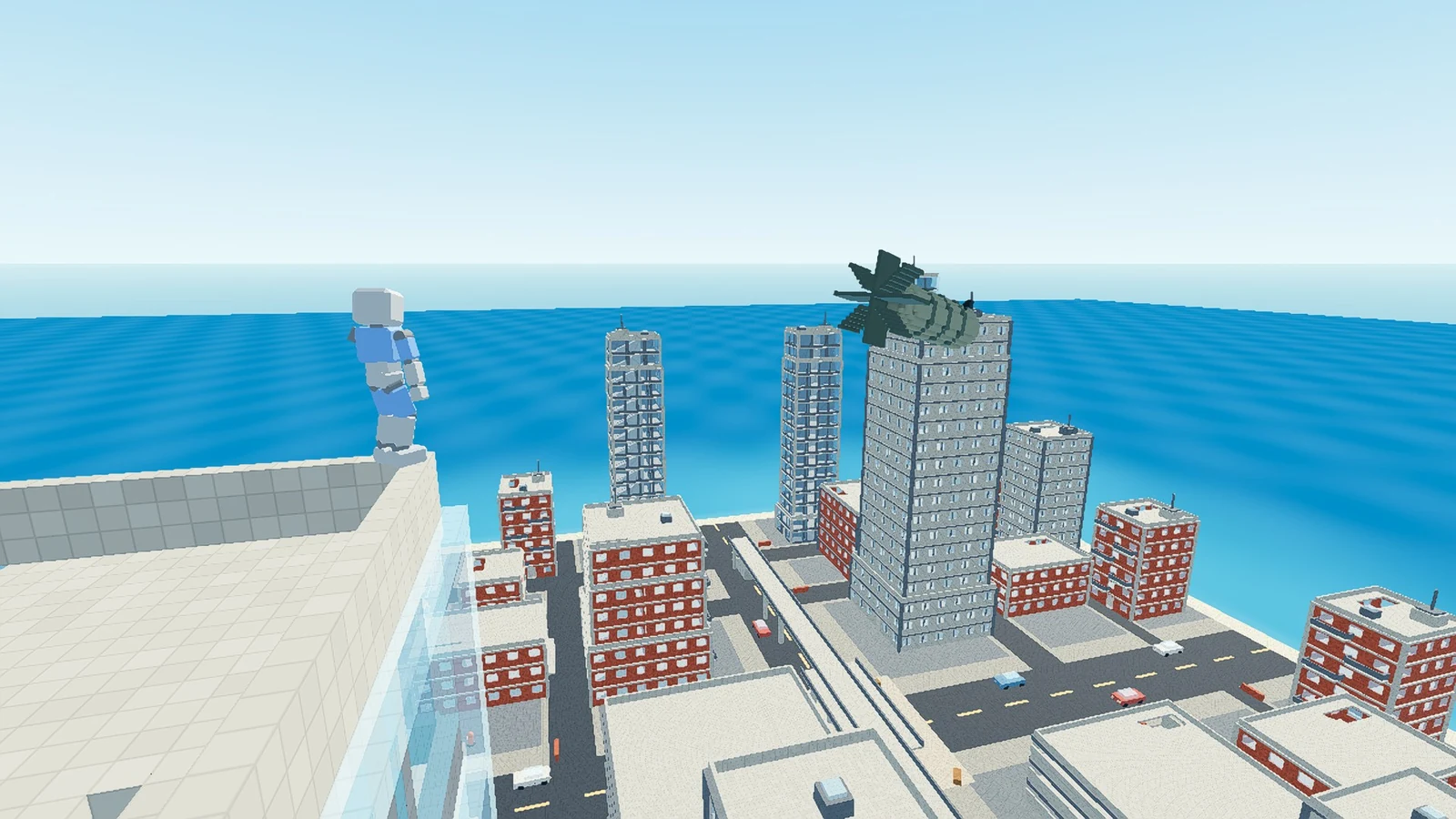
Structurally, a city is the best possible map for a game about harvesting buildings. The walls you shoot through are the walls you extract from, and the destructible map means a long Tokyo 3 match progressively hollows the skyline out into a lattice of floating fragments. It is worth playing Tokyo 3 specifically to watch that happen.
Training, on any map
The training option shares the same three destinations, which is the single most useful thing about it. You learn the extraction rhythm and the voice timing on the same geometry you will fight on, and the TRAINING banner at the top of the screen is the confirmation that no bot is coming for you while you work it out.
Training is not a separate simplified map. It is the real arenas with the pressure removed, and that is the point: the map-specific decisions, like whether the Tokyo 3 towers are worth the material or whether the Space debris is reachable, are only meaningfully made if you have already learned the loop.
What the map means for your material
Two things follow from the map being destructible, and both are worth planning around.
The first is that the map is your ammunition. A tall building in Tokyo 3 is not cover, it is a stockpile you have not dug into yet. A player who understands this stops treating walls as scenery and starts treating them as inventory.
The second is that late in a match, sight lines change. The wall you were hiding behind may have been mined away by the player on the other side of it, or by your own teammate, or by the explosion of a grenade you fired. In a long Tokyo 3 match the map you memorised in the first thirty seconds stops being accurate. Assume you will need to relocate, and take cover you can move away from.
Multiplayer — 2 to 4 players
Direct IP, same network or Radmin VPN. No matchmaking, no crossplay yet.
LAVOICE has no server browser and no matchmaking queue. The official page says to connect by IP, either on the same network or through Radmin VPN, and you can also play solo against a bot. That is the whole of the multiplayer story: the host opens a room and shares an address, and everybody else joins by typing it in.
Host and guest, side by side
Host and guest
| Step | Host | Guest |
|---|---|---|
| 1 | Install Radmin VPN | Install Radmin VPN |
| 2 | Create network, name and password | Join network with the same name and password |
| 3 | Write down the virtual IP | Check that you both appear on the same network |
| 4 | Open the room in game and send the IP | Paste the Radmin IP, not your public one |
| 5 | Allow the game and Radmin in the firewall | Same |
| 6 | Same build (H-4) | Same build (H-4) |
Note that step three — write down the virtual IP, not your public one. That is the single most common mistake in the whole process, and it is what the “connection ended” error almost always means.
When the room will not connect
When the room will not connect
| Symptom | What to check |
|---|---|
| Connection ended | Are you both on the same Radmin network? Is the IP the virtual one? |
| The friend never appears | Firewall, antivirus, and the same zip version on both PCs. |
| High ping | If Radmin shows a relay, the route went the long way around. There is no LAVOICE port to open. |
| Nobody hears the team | Hold Caps Lock and pick the right mic in TEST VOICE. |
| You want to play on a phone | A mobile version was announced on 2026-10-25, but nothing is public yet. See the download chapter. |
Team voice, and why the key is awkward
Team voice is Caps Lock held down. It is completely separate from the V that builds weapons, and it is the only way to talk to the people you are playing with. There is no push-to-talk on a mouse button and no in-game chat box.
The awkwardness is real and worth planning for: you need one hand on V to build and the other hand on Caps Lock to talk, and those are on opposite sides of the keyboard. In practice players either accept that they cannot build and talk at the same instant, or they lean on T to type requests while they talk. Either way, agree on a shorthand with your party before the match starts — two minutes of “short request, then talk” saves a round.
Why crossplay is not here yet
The developer has said the goal is for macOS, Linux, Windows and Android to connect in one party, comfortably and reliably. That plan is tied to a Steam release, and no cross-platform build is public yet. So today: the desktop build on Windows is the multiplayer build, and everyone else is waiting.
The reason given for tying it to Steam is distribution economics — the developer points out that Steam makes cross-platform distribution simpler and avoids the fees charged by stores like Apple's. In other words, crossplay is on the roadmap, but the roadmap goes through a storefront first.
Playing with a party, in practice
Two-to-four-player LAVOICE with a shared destructible map and no matchmaking has one characteristic that matters more than any other: you are all spending the same resource. Every block one player extracts is a block the others cannot extract. Four players mining the same floor in the same twenty seconds will empty a map that one player could have farmed for a minute.
The practical advice that follows from this is simple and it is worth saying plainly: divide the roles. One player on extraction duty while the others hold ground, then swap. It is the same logic as any shooter with a shared objective, but here the objective is literally underneath everybody's feet.
Homing and tracking projectiles
What the developer says about the guided property — and the one that is not in the build yet.
There are two different aiming behaviours in this game and they are easy to confuse, because both involve holding the right mouse button. One exists in the current build; the other has been announced by the developer but is not implemented yet. This chapter separates them, because the second one is the kind of thing that ends up repeated as if it were already playable.
Guided projectiles: in the build
When a request carries the guided property, the resulting projectile behaves the way a guided missile behaves in Half-Life — and the developer says so explicitly. The description, in their own terms: when you fire while holding the right mouse button and aiming, a red point appears on the weapon's crosshair, and holding the aim makes the missile turn and hit whatever you are aiming at.
In practice that means three things:
- Fire while holding right click. A normal click fires straight. Right click is the aim, and the guided property only engages while you hold it.
- Watch for the red point on the crosshair. That point is the guide. It appears on the weapon, not in the world, and it is the confirmation that the projectile will turn.
- Keep the aim on the target while the projectile is in flight. The missile turns back towards what you are pointing at, so moving your aim mid-flight steers it.
The developer also volunteered the combination they think is funny, and it is a genuinely good idea: apply the guided property to a minigun of guided missiles, so that you are steering a barrage of explosions rather than a single shot. That is the sort of thing the mount grammar exists to produce — one property, applied to a weapon with a high rate of fire, produces something that is not really either of the two things on their own.
Following the enemy: announced, not shipped
In the same exchange, a player asked whether a request could make something automatically pursue an enemy, the way the bot does. The developer answered that there is a separate property coming which is not the guided property, that it will follow the closest target automatically, and that it was still to be added.
So: it is planned, it is described, and it is not in the current build. If you are looking for a way to make a drone that hunts down the nearest opponent on its own, it does not exist yet in H-4. The guided property is the closest thing that does, and it is different — it requires you to hold the aim.
The difference, in one line each
Two aiming behaviours
| Behaviour | In H-4? | How it works | What you do |
|---|---|---|---|
| Guided projectile | Yes | Hold right click while firing. A red point appears on the crosshair and the missile turns towards what you are aiming at. | Fire with right held, and keep the aim on the target. |
| Follow the enemy | Not yet | Announced by the developer as a separate property that picks the closest target on its own. Still to be added. | Nothing yet. Use the guided property instead. |
How to get guided projectiles
Ask for the property in the request itself, in the same slot where you would name an object. The publisher's published sentence list does not include a guided example verbatim, so the exact wording that the dictionary expects is not publicly documented — and the developer has explicitly asked players to send the voice log for phrases that did not land, which is how a phrase like this gets added to the dictionary.
Two practical routes, in order of reliability:
- Type it. Press
Tand try a few wordings of the same idea. If one of them builds, you have found the vocabulary, and you now know exactly what to say. - Read the transcript. When the build fails it shows
NÃO ENTENDIand what it heard. That tells you which word was recognised and which was not, and it turns a guessing game into a debugging session.
Troubleshooting every message in the game
The Portuguese status strings, what they mean, and what actually fixes them.
LAVOICE reports most of its failures in Portuguese, on screen, in the same words regardless of the language you are playing the interface in. That trips up English-only players constantly, because the message appears and disappears faster than you look up a translation. Here is every one of them.
The four messages
Status strings and what they mean
| On screen | Meaning | Fix |
|---|---|---|
NÃO ENTENDI | The request was parsed but did not resolve to a build. | Read the transcript it shows. Shorten the sentence, or type it with T. |
NADA AO ALCANCE | Nothing was within reach to extract. | Aim at an actual block. Empty air has nothing in it. |
FALTOU MATÉRIA | The request needs more material than you are carrying. | Tap V and extract more, or ask for something cheaper. |
VOAR | Flight is active — and it is spending material. | Land before you extract. Movement requests cost blocks too. |
CARGA | Your carried load, and how much it is slowing you down. | The observation in build footage shows a load of 18 kg at -20%. Spend some of it. |
Nothing happens when you hold V
Four causes, in the order you should check them:
- Microphone permission was never granted. The browser asks before it records anything, and a dismissed prompt is a silent permanent failure. Check the padlock icon in the address bar — on the browser build the microphone permission has to allow this specific site.
- The wrong input device is selected. The voice settings panel has a microphone selector. Headset, laptop and external microphones all show up separately, and a build with several devices can default to the wrong one. Run the microphone test and watch the input level.
- The threshold is set too high. The voice panel has a minimum-volume setting. If it is set for a loud room and you are in a quiet one, your voice never crosses the threshold, and the game never hears you at all.
- You are holding the key but not speaking. The build starts when you release, so a long silent hold produces nothing. If you release without saying anything, there is no request to parse.
The build succeeds but nothing happens
If the percentage runs to a hundred and you get a weapon, the pipeline worked. If the percentage runs and then nothing appears, check the slot indicators on the HUD. Three boxes numbered one to three, all reading EMPTY, mean the build did not land in a slot. Switch weapons and look again.
The map does not load
There is a fresh player report on the official page, dated 2026-10-31, that the map does not load and that the map selection mode does not load properly, with a screenshot attached. That is a bug report against the current build, not a configuration mistake on your side.
What you can do about it in the meantime:
- Back out of the map selector with the BACK button and re-enter it rather than reloading the whole page.
- Use the training option on the same map. Training uses the same destinations, so if the arena loads in training, the geometry is fine and the problem is in the match setup.
- Play the browser build on this page, which runs a different packaging of the same game and is unaffected by the desktop build's state.
If you hit it on the desktop build, the developer asks for reports, and the r/LAVOICE subreddit is the fastest place to find the current status.
The antivirus warning
Some players report Windows or their antivirus flagging the game. The developer has explained why, and the explanation is a good one to know before you spend an evening convinced your download is malicious.
LAVOICE is distributed outside a store, so it does not carry a paid code-signing certificate. Windows security software reacts to unsigned executables by warning about them. On top of that, the game's assets are encrypted inside its container file, which means a scanner cannot look inside to see what it contains — and a heuristic scanner that cannot see inside an encrypted package will often guess badly.
First launch is slow
The official page says the first launch may take a little longer while the voice engine loads. That is expected. On the browser build the first load is heavier still, because the whole WebAssembly pack has to come down before the game starts — it runs to tens of megabytes, and on a slow connection the first load can take minutes.
Give it time before deciding it is broken. If you are here for a quick session, the browser build on this page will not ask you to install anything at all.
Requests work in English but not in Portuguese, or the reverse
Both languages are supported and the publisher publishes both sentence lists. If one language is failing for you consistently while the other works, it is almost certainly the specific words you are using rather than the language itself. Compare against the published list for your language, and if your sentence is not on it, try the exact published wording. If that works, you have found the vocabulary and you can adapt from there.
And if nothing matches, send the voice log. That is genuinely how the dictionary grows, and it is the single most useful thing a frustrated player can do.
Browser build or desktop build?
Two ways to run the same game, with genuinely different plumbing under them.
LAVOICE ships as a free Windows download, and this portal also runs the game inside your browser. They are the same game — same maps, same HUD, same material rules, same voice grammar — but the voice pipeline underneath is built completely differently, and knowing which one you are on saves a lot of confusion when something does not work.
The short version
Build comparison
| Desktop build | Browser build (this site) | |
|---|---|---|
| Cost | Free | Free |
| Install | Download a 521 MB zip, unblock it, extract, run | Nothing |
| First load | Slower — the voice engine loads | Slower — the whole WebAssembly pack downloads |
| Voice recognition | Bundled, local, offline | The browser's Web Speech API |
| Needs internet to play | No | Yes, after the first load |
| Works in Firefox | Yes | Voice does not; use T to type |
| Microphone permission | Handled by the game | Handled by the browser, per site |
| Voice sent off the machine | No | Possibly, depending on the browser |
| Newest builds first | Yes | No — it is a port of H-4 |
What actually differs
The microphone engine
This is the whole difference, and it matters more than the table suggests.
On the desktop build, recognition runs on your own machine with no internet connection at all. The engine is bundled with the game, which is why the download is several hundred megabytes and why the first launch takes a little longer while the voice engine loads. The upside is total independence: you can play LAVOICE with the network unplugged.
On the browser build here, the browser's own Web Speech API does the listening. The game is the same; the microphone handling is the browser's. That has two practical consequences. First, the browser may need an internet connection, because on Chrome the audio is processed by the browser vendor's servers for transcription. Second, browser support is uneven — Firefox does not implement the Web Speech API, so on Firefox the voice path is unavailable and you must type with T.
Where the game files come from
The browser build here is the publisher's Windows build compiled to WebAssembly and served from a separate host. That means the first load pulls the whole pack — tens of megabytes — and it needs a real connection. After that first load it is cached.
What is identical
The map geometry, the HUD, the material counter, the weapon slots, the damage model, the destructible map, the Portuguese status strings, the grammar of a request, the multiplayer behaviour. None of that changes between builds. If a mechanic works on one build it works on the other, and a bug in one is usually a bug in the other.
Which one should you use?
For a first visit, the browser build wins: no download, no unzip, no antivirus decision, no code-signing question. Press play and you are in the arena. The cost is the first load and, on some networks, the microphone.
For a dedicated session or for offline play, the desktop build wins: no network dependency at all, a microphone engine you fully control, and it is the build the developer is actually iterating on, so new features land there first.
For voice specifically, there is a third option that is worth remembering on both: press T and type. It is the publisher's own documented alternative for players with no microphone, and it removes the recogniser from the loop entirely. A typed request costs exactly the same material and produces exactly the same weapon.
A note on privacy
On the browser build, voice recognition is handled by your browser. Depending on the browser and the operating system, that recognition may be processed by your browser vendor's servers — Chrome, for example, sends audio to Google for transcription. No audio is stored by this site. The desktop build is different in kind: its engine is local and offline, so your voice never leaves the machine.
That difference is worth weighing if you are on a shared machine, in a room where voice would be inappropriate to transcribe, or simply if you prefer your microphone data to stay local. The full details are on the privacy page.
T, and type “I want a pistol that shoots”. If that builds, everything except the microphone works, and you have isolated the problem to the audio path. If it does not build, you have a grammar or material problem and the microphone is irrelevant.What has changed so far
There is no official changelog, but the devlog and the download history are dated.
LAVOICE is in development and the publisher has not published a formal changelog. What there is, though, is a dated devlog, a dated itch.io page with a download history, and a subreddit. Those give a timeline that is accurate even where it is sparse, and this is it.
- 2026-10-20The first public build. LAVOICE-H2-Windows.zip went live on itch.io at 01:13 UTC, free, Windows 10/11 64-bit.
- 2026-10-21The itch.io page was updated at 20:51 UTC, and the r/LAVOICE subreddit was created the same day. The page refresh was not a patch.
- 2026-10-25Devlog: LAVOICE MOBILE! published at 21:21 UTC. The mobile version was announced; nothing is downloadable yet.
- 2026-10-27Devlog: H-4 — atomic bombs, rebuilt models and more at 12:24 UTC, followed by the itch.io page update at 17:44 UTC with LAVOICE-H4-Windows.zip. The desktop build also gained English voice commands.
- OngoingThe dictionary is being built by players. The developer asks for the voice log whenever a phrase fails, so that it can be added to the dictionary. Those logs are the mechanism behind the growth of what the game understands.
- This portalThe same game compiled to WebAssembly so it runs in a browser, with the browser's Web Speech API wired into the same voice pipeline the desktop build uses. Press
Tif you would rather type.
What H-4 changed
Two things are named in the devlog entry: atomic bombs, and rebuilt models. Atomic bombs is a new weapon concept — another entry in the mount grammar, and given that H-4 also brought English voice commands to the desktop build, it is reasonable to expect it to be reachable in both languages now. Rebuilt models is a visual pass on the 3D assets rather than a mechanic.
The fourth build in about a week is fast progress for a solo developer, and it tells you something about what to expect from the numbered builds: they move fast, they are not always backwards compatible, and the file name changes with every one of them. Keep the old zip if you are mid-session with friends.
What is on the roadmap
Three things have been said out loud by the developer, and they are worth separating by how firm they are.
- Mobile. Announced in a dated devlog entry on 2026-10-25 with the title LAVOICE MOBILE. No public APK, and Google Play does not list the game.
- macOS and Linux builds. Planned, and tied to a Steam release. The developer explains the reasoning as distribution cost — Steam avoids the fees charged by stores like Apple's, and simplifies shipping to several platforms at once.
- Crossplay. The stated goal is that macOS, Linux, Windows and Android can all connect in one party, comfortably and reliably. It follows from the two items above and has no date.
There is also a smaller, more concrete item that was discussed in the same thread: a property that makes a built object follow the closest enemy on its own, separate from the guided property. That was acknowledged as something to add, and it is not in H-4. Homing and tracking covers both of these aiming behaviours in detail.
How to follow the updates
Three places, in order of usefulness:
- The devlog on the itch.io page. Dated entries, published by the developer. This is the authoritative source for what changed.
- The itch.io comment thread. The developer answers questions there in detail — the guided-projectile behaviour, the antivirus false positive, the crossplay plans. This is where the practical knowledge lives.
- r/LAVOICE. For bug reports, phrase requests, and the voice logs the developer asks for.
Download LAVOICE
The free Windows build, the system requirements, and where the game is not available.
The official desktop build is free. The current file is LAVOICE-H4-Windows.zip, 521 MB, for 64-bit Windows 10 or 11 with a graphics card that supports DirectX 12. Unblock the file, extract it, and run the executable. The desktop build speaks English and Portuguese; the browser build here runs the same game with the browser doing the listening.
GET THE FREE WINDOWS BUILD OFFICIAL ITCH.IO PAGE
Where LAVOICE runs
| Platform | Status |
|---|---|
| Browser | Plays here on lavoice.app — the WebAssembly build with Web Speech API voice control. |
| Windows 10/11 (64-bit) | Official free build on itch.io, build H-4. DirectX 12, English and Portuguese. |
| Android / iPhone | Announced in the devlog on 2026-10-25. No public APK, and Google Play does not list the game. |
| Steam | No store page yet. The developer has said macOS and Linux builds are planned around a Steam release. |
| macOS / Linux | No build yet. |
| Crossplay | Planned as part of a Steam release, with no date announced. |
Verify what you downloaded
The publisher publishes a SHA-256 checksum for the release, and this is worth doing. An unsigned executable from outside a store will set off antivirus software, and being able to prove your file matches the published one byte for byte settles that argument immediately.
Open the download folder, right-click an empty area, choose Open in Terminal, and run:
Get-FileHash .\LAVOICE-H4-Windows.zip
The hash must match the one published on the official page. Uppercase letters do not matter. If it differs, do not open the file — download it again.
Verify your download (SHA-256)
| File | SHA-256 |
|---|---|
LAVOICE-H4-Windows.zip | bf826853c6089b3a0bb05363ccde8ec4128966e2716b479eec690436b243f52b |
Windows will probably warn you
Expect a warning from Windows or your antivirus, and expect it to be a false positive. The developer has explained the cause directly: the game is distributed outside a store and does not carry a paid code-signing certificate, and its assets are encrypted inside the container file, so a heuristic scanner cannot see inside and guesses badly. There is no trojan in it.
If you would rather not deal with exclusions, the browser build on this page runs the same game with none of that.
The first launch
The official page notes that the first run takes a little longer while the voice engine loads. That is the offline recognition engine being brought up, and it is why the download is as large as it is. Subsequent launches are fast.
On the browser build the first load is comparable in weight but for a different reason: the entire WebAssembly pack has to download before the game can start. Give it a couple of minutes on a slow connection.
Where LAVOICE runs
Where LAVOICE runs
| Platform | Status |
|---|---|
| Browser | Plays here on lavoice.app — the WebAssembly build with Web Speech API voice control. |
| Windows 10/11 (64-bit) | Official free build on itch.io, build H-4. DirectX 12, English and Portuguese. |
| Android / iPhone | Announced in the devlog on 2026-10-25. No public APK, and Google Play does not list the game. |
| Steam | No store page yet. The developer has said macOS and Linux builds are planned around a Steam release. |
| macOS / Linux | No build yet. |
| Crossplay | Planned as part of a Steam release, with no date announced. |
A final word on what is free
LAVOICE is listed as free on itch.io and costs nothing to download. The game is in development, and the publisher says plainly that it is a test version and that bugs should be expected. Reporting them — along with the voice log for any phrase that fails to land — is the most useful thing a player can do while the game is still being shaped.
Frequently asked questions
The questions that come up most, answered at length.
Is LAVOICE free?
Yes. The official itch.io page lists it as a free download. The current file is LAVOICE-H4-Windows.zip, 521 MB, and the publisher publishes a SHA-256 checksum for it. There is no trial, no demo cut and no premium edition.
Can I play LAVOICE in a browser?
Yes, on this site. The game is embedded below the play button on the homepage and runs directly in the page — no download, no plugin, no account. It is the publisher's build compiled to WebAssembly, with the browser's own speech recognition feeding the same voice pipeline the desktop build uses.
The trade-off is the microphone. On the desktop build recognition is bundled and offline. In a browser it is the browser's Web Speech API, which means Chrome may send your audio to Google for transcription, and Firefox does not support the API at all. On Firefox, or if you would rather not use a microphone, press T and type the request — it is a documented part of the game, not a workaround, and it works identically.
What do I actually say?
Short sentences in a fixed shape: want, quantity, object, that, action. “I want a pistol that shoots a pigeon that poops grenades” is the publisher's own headline example. The full published list, in English and Portuguese, is in Voice commands, along with a breakdown of each slot in the grammar.
Why does the game not understand me?
Four usual reasons, in the order worth checking: microphone permission was never granted; the wrong input device is selected; the minimum-volume threshold is set too high for your room; or the sentence is not in the dictionary. The last one is the most common among players whose microphone demonstrably works, and the fix is to shorten the sentence or type it. The game shows you the transcript it caught, so you can see which word it missed.
What is the difference between tapping V and holding V?
Tap V to enter extraction mode and pull blocks out of the map. Hold V to speak a request, and release to have it built. Mixing the two up is the single most common beginner problem, and there is a whole chapter on it.
How do I get more material?
Extract it. Tap V, aim at actual blocks, and the MATÉRIA counter goes up. You need material before you can build anything, and bigger requests cost more of it. When a request fails with FALTOU MATÉRIA, the build simply stops — there is no partial result and no refund. Material covers the economy in detail.
Can I play with friends?
Two to four players, by IP address. You can be on the same network, or use Radmin VPN to share a virtual network, then the host opens a room and everybody joins by typing in the virtual IP. There is no matchmaking and no server browser. Team voice is Caps Lock held down. Multiplayer has the full host and guest procedure.
Is there crossplay?
Not yet. The developer's stated goal is that macOS, Linux, Windows and Android can all join one party comfortably and reliably, but that plan is tied to a Steam release and no cross-platform build is public. Updates covers what is confirmed and what is only planned.
Is it on mobile or Steam?
Mobile was announced in a dated devlog entry on 2026-10-25, but there is no public APK and Google Play does not list the game. Steam has no store page yet; macOS and Linux builds are planned around a Steam release, which the developer says is also a way to avoid the fees charged by stores like Apple's.
Is the antivirus warning real?
No. The developer has explained it directly: the game is unsigned because it is distributed outside a store, and its assets are encrypted inside the container file, so a heuristic scanner cannot look inside and guesses badly. There is no trojan. You can confirm your download independently with the published SHA-256 checksum.
Who made LAVOICE?
Tsomyst, a solo developer. The game is published on itch.io, with a subreddit at r/LAVOICE and a devlog on the itch.io page. The developer answers questions in the itch.io comment thread, which is the best place to find current information.
Does it cost anything, or grind?
No and no. There is no microtransaction, no currency, no unlock and no progression system. The only currency in the game is material, and it comes out of the walls.
Why does the map look different every match?
Because the map is fully destructible and material is extracted from it. As players dig blocks out, the arena genuinely empties out over the course of a match. Three destinations exist in the current build — Original Arena, Space and Tokyo 3 — and Maps and arenas looks at what each one is like.
What if the browser game does not load?
Three things, in order. First, check that you are on a modern browser — the WebAssembly build needs one. Second, note that the first load pulls a large pack and can take a couple of minutes on a slow connection, so wait before assuming it failed. Third, try the desktop build on itch.io, which is independent of anything happening here.
Where do I report a bug or a phrase that does not work?
The itch.io comment thread and r/LAVOICE. If the phrase did not land, send the voice log the game recorded as well — the developer asks for those specifically so the failed phrase can be added to the dictionary.
Glossary and quick reference
Every Portuguese word the interface uses, every key the official table lists, and a symptom table for the things that go wrong.
The interface of LAVOICE is Portuguese, and the game itself understands English and Portuguese voice requests. For a player who does not read Portuguese, the interface is the only part of the build that is not in your language, so this appendix exists to remove that small wall. Nothing here is new information: the strings are the ones visible in the publisher's own H-4 build, the key list is the official control table from the itch.io page, and the symptom table is a summary of the fixes described in Troubleshooting.
The words on the screen
These are the interface words you will actually meet, with what each one is telling you at the moment you see it.
Interface strings
| On screen | Language | What it means |
|---|---|---|
| CRIAR | Portuguese | Create. The button that starts a request and builds a weapon. |
| PERSONALIZAR | Portuguese | Customize. Cosmetics and player options. |
| TREINO | Portuguese | Training. The map set with no bot shooting at you. |
| AJUSTES | Portuguese | Settings, including the voice panel and the microphone test. |
| SAIR | Portuguese | Quit. |
| TESTAR VOZ | Portuguese | Test Voice. The main-menu button that checks your microphone. |
| MATÉRIA | Portuguese | Matter, which the interface uses for material. It is the block counter. |
| VAZIO | Portuguese | Empty. What a weapon slot reads until you build into it. |
| ESCUTANDO | Portuguese | Listening. The HUD state while you hold the request key. |
| CONSTRUINDO | Portuguese | Building. The HUD state, with a percentage, while the weapon is assembled. |
| NÃO ENTENDI | Portuguese | I did not understand. It is shown with the transcript the game caught. |
| EXTRINDO | Portuguese | Extracting. The HUD state while blocks are pulled toward you. |
The key list, in one place
This is the official control table, unchanged, with a short note on what each binding is actually for in play. The Controls chapter covers the same ground in more detail, including what to do when a key does nothing.
Official control table
| Action | Binding |
|---|---|
| Move and face | WASD / arrow keys |
| Speak a request | Hold V |
| Extract material | Tap V |
| Type instead of talking | T |
| Shoot / aim | Left click / right click |
| Jump / sprint / crouch | Space / Shift / C |
| Third-person camera | Mouse wheel |
| Talk to your team | Hold Caps Lock |
| Options and microphone test | ESC |
Symptom, cause, fix
The fastest way to use this page: find the thing that is happening to you, and read across.
Symptom table
| What happens | Why | What to do |
|---|---|---|
| Nothing happens when you press V | You are holding the key, so the game is listening instead of extracting. | Tap it instead of holding it. One press extracts, a held press talks. |
| The screen says NÃO ENTENDI | The sentence did not fit the grammar, or a word was lost in the noise. | Shorten it, press T and type it, or read the transcript it showed you. |
| The microphone level meter never moves | The browser or the operating system is blocking input. | Allow the microphone for this site, then run TEST VOICE again. |
| BUILDING appears but nothing is built | Not enough material for the request you asked for. | Extract more blocks and watch the MATÉRIA counter. |
| A weapon slot stays empty | The build was refused, or the slot was not selected. | Check the material counter, then select the slot before you request. |
| The first launch takes a long time | The offline voice engine loads before the menu settles. | Wait. It is the publisher's own note about the desktop build. |
| Two friends cannot see each other | Multiplayer needs direct IP, the same network, or Radmin VPN. | Use one of the three routes in the Multiplayer chapter. There is no matchmaking. |
| The browser build will not start | The WebAssembly pack is large and the first load is slow. | Give it a couple of minutes on a slow line, or use the desktop build. |
| An antivirus flags the download | The build is unsigned and ships encrypted assets, which trips heuristics. | This is the reason the developer gives. Check the SHA-256 in the Download chapter. |
The one-page version
If you only read one part of this library, read this list. It is the whole game in eleven lines, and every line expands into a chapter above.
- Tap V to take blocks out of the world. Holding V is for talking. A tap pulls material toward you and fills the MATÉRIA counter; a hold opens the microphone. If you hold V by accident while walking around, you will spend the match listening instead of playing.
- Hold V and say one short sentence to build a weapon. The shape is want, quantity, object, that, action — “I want a shotgun that shoots”. Long sentences do not parse, and the screen will show you the transcript it caught so you can see which word it lost.
- Press T to type the same request instead. Same grammar, same material cost, same result, no microphone involved. This is the reliable path and it is free.
- Everything you build is paid for in blocks you took out of the arena. The map is destructible and it does not grow back, so the ammunition and the arena are the same resource. Spend too early and you are fighting on a floor that no longer exists.
- You get three weapon slots and one loadout. Build the weapon you need for the fight in front of you rather than the one that sounds best; the Weapon slots chapter works through what to build first and why.
- HOLD V means “hold the key”, not “hold the mouse”. The mouse is for shooting and aiming. The voice is a modifier on the keyboard.
- Right click is the guided shot. Hold the right mouse button to aim, the crosshair picks up a red point, and the projectile turns toward it. That is the developer's own description of the guided property.
- HOLD CAPS LOCK is team chat. It is a separate channel from the voice commands, so you can talk to your squad without spending a sentence on it.
- ESC opens the options and the microphone test. Run that test before you blame your microphone, your accent or the game.
- The first launch is slow on the desktop build. The offline voice engine loads before the menu settles; that is the developer's own note, not a fault on your machine.
- The browser build and the desktop build are the same game. The browser version listens with the browser's own speech recognition; the desktop version carries its own offline engine. Read Browser or Desktop before you decide which to use.
Where the numbers come from
Two of the numbers in this page are observations rather than published facts, and they are worth flagging one last time. The 0/300 reading on the MATÉRIA counter and the three weapon slots come from captured frames of the publisher's H-4 build. The developer has published no price table for materials, no frame data and no damage figures, so this library does not print any. When the developer publishes them, this page should be corrected; until then, the honest statement is that the value exists and has not been published.
Everything else quoted in the fourteen chapters above comes from the publisher's own pages: the itch.io game page with its control table and its seven example sentences, the H-4 devlog entry of 27 October 2026, the mobile devlog entry of 25 October 2026, the developer's answers in the comment thread, and the official promo animation. The Download chapter carries the verified file name, size and checksum for the current Windows build.